CALVIN GOZÉ
Gradient Optimization Application for MATLAB
Apr 14, 2020
Recently, for my Numerical Analysis class, I was required to develop a gradient optimization algorithm in MATLAB. Gradient optimization (commonly called gradient descent or ascent) is an iterative algorithm used to find local minimum or maximum of a scalar function. The algorithm works by starting at an initial point on a function and incrementally taking steps towards the function’s minima or maxima, depending on whether it’s set to descend or ascend. The algorithm is relatively simple and is based on this formula:
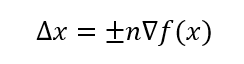
where Δx is the step size, n is the step size factor (also known as the learning rate), x is the initial position, and ∇f is the gradient of the function being optimized. The ± depends on whether the function is ascending (+) or descending (-). After the step size has been calculated, it’s added to the initial position. This process is repeated until ∇f(x) is close to zero, or less than a set tolerance value. The final result is a position on one of the functions optimal points. The formula can also include a momentum component to prevent the algorithm from settling on a plateau within the function:

where x_t is the current position, y is the momentum factor, and Δx_t-1 is the size of the previous step.
Because of the algorithm’s simplicity, I thought I’d make it a little more interesting and turn it into a MATLAB app. This application can take a scalar function of any dimension and preform gradient optimization on it. The function, along with the path the algorithm took to reach the optimum, is plotted in the top right corner of the app window. The second plot visually represents the efficiency of the algorithm, plotting steps against their respective distance from the optimum. Step size, momentum, and tolerance of the algorithm can all be easily controlled by the user via a knob, slider, spinner and toggle controls on the user interface. Since the MATLAB App Designer provides a variety of creative looking UI components, I thought I’d have some fun and make the app look a little extra. Below is a gif of the app being used to optimize a function. The optimal point is displayed in the bottom right corner of the app window.
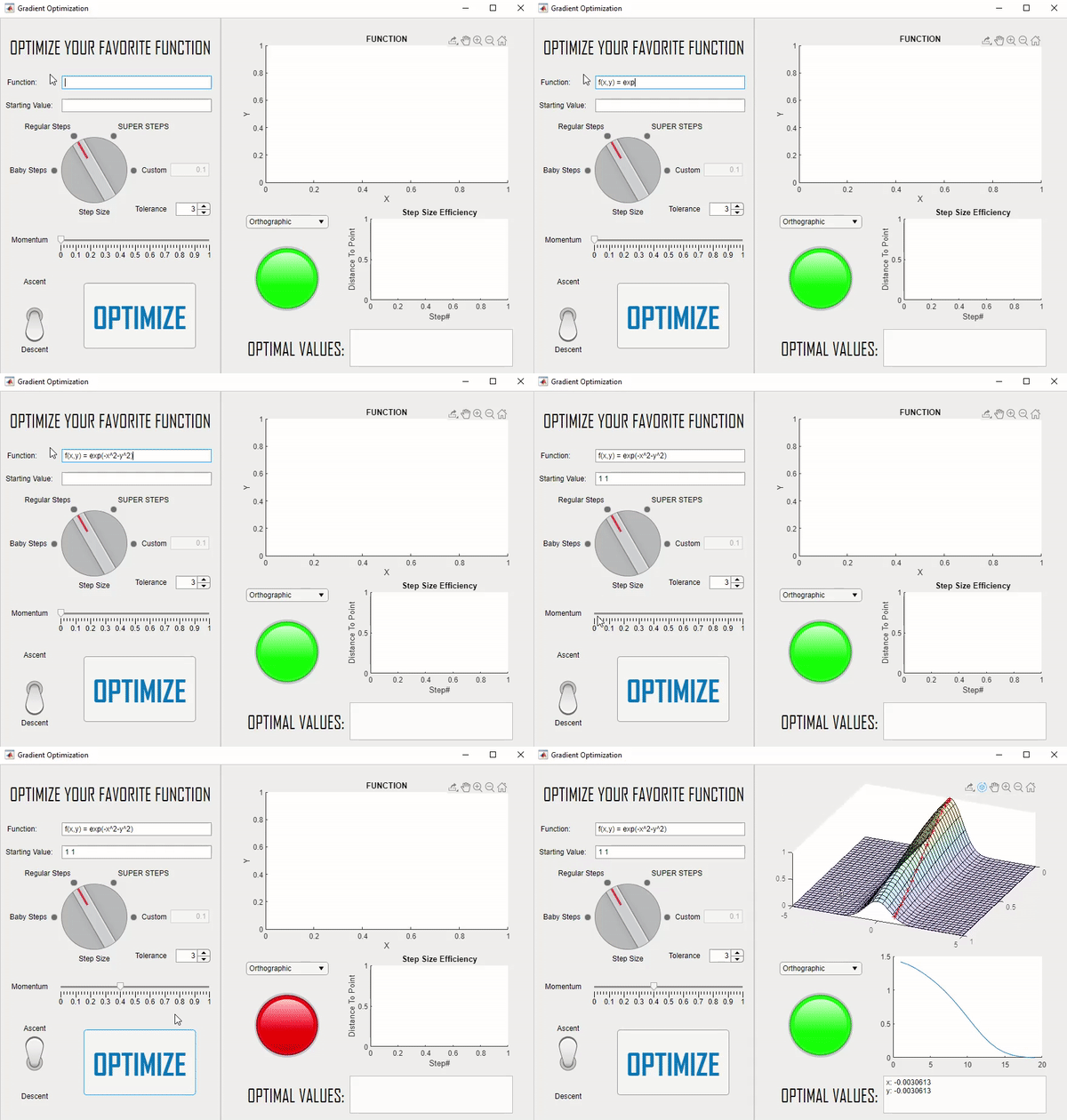
The most difficult part of this application was developing the app’s ability to take a function of any dimension as a string input and turning it into a symbolic function that MATLAB could understand.
Currently, this app has several bugs I hope to fix in the future. There’s no maximum amount of iterations, so if a user sets it to find a maximum on a function that doesn’t have one, the algorithm will continue running, forever, in search of a nonexistent maximum. The only way to exit this infinite loop is to forcibly close the application.
The source code for this project can be found in my Gradient-Optimization Git repository. Have fun!